
Best Used MacBook Air M3 Deals Today
AI-curated top picks from hundreds of eBay listings. Updated daily with verified sellers and transparent pricing.
Top Picks Today
Updated: 19 Apr 2026

Used

Used
Used

Used
Excellent - Refurbished
Very Good - Refurbished
![Apple MacBook Air 13-inch with M3 Chip, 256GB/16GB Midnight [Refur] - Excellent](https://i.ebayimg.com/images/g/AWcAAeSwzmBp3bRm/s-l1600.jpg)
Excellent - Refurbished
![Apple MacBook Air 13-inch with M3 Chip, 256GB/16GB Midnight [Refur] - Excellent](https://i.ebayimg.com/images/g/akYAAeSwTpVp45Wl/s-l1600.jpg)
Excellent - Refurbished
![Apple MacBook Air 15-inch with M3 Chip, 256GB/16GB Space Grey [Refur] - Excel...](https://i.ebayimg.com/images/g/kBAAAeSwwv9p3bQe/s-l1600.jpg)
Excellent - Refurbished
Excellent - Refurbished
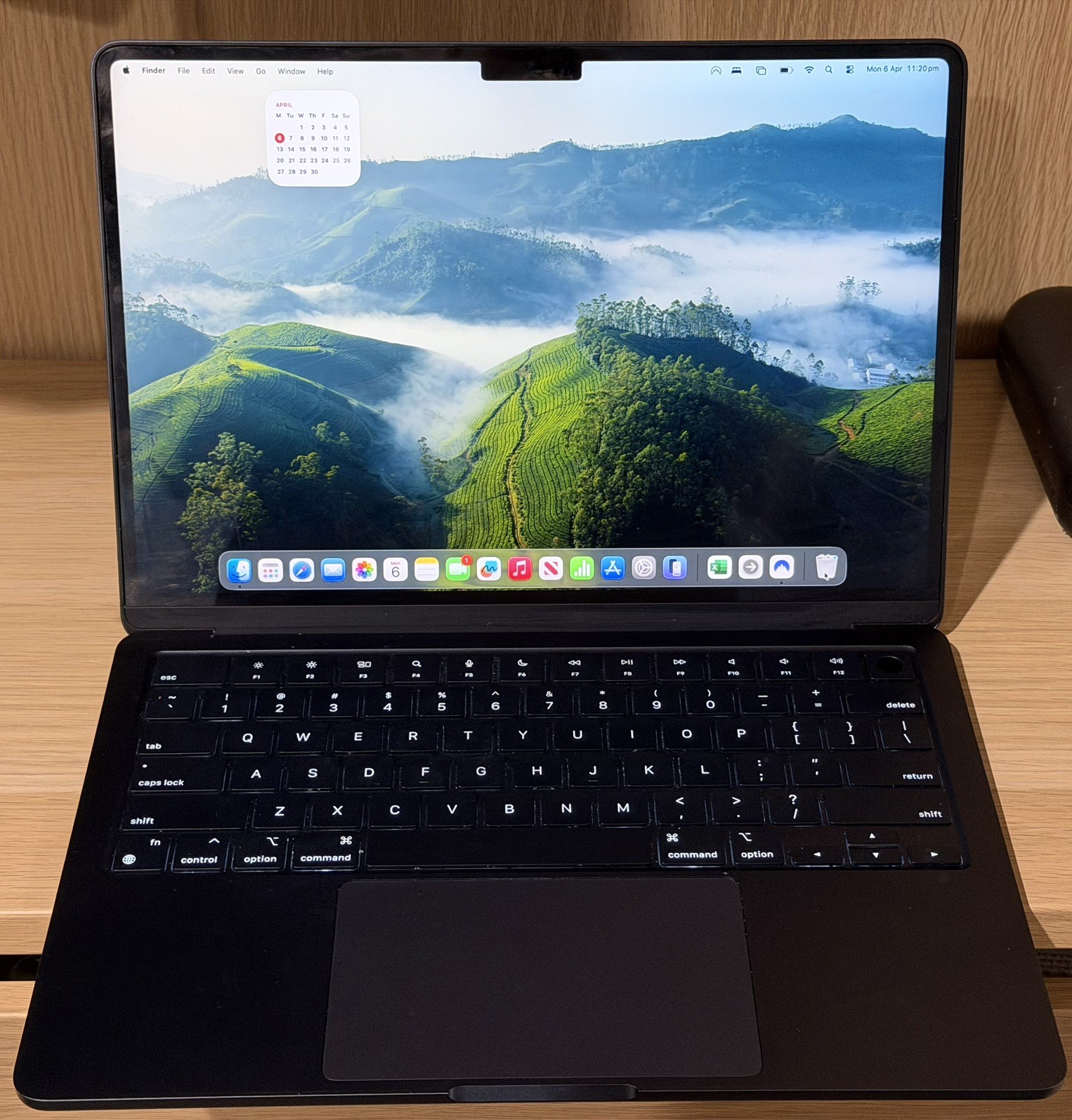
MacBook Air M3 13” (2024) 1TB SSD, 8C CPU, 10C GPU, 16GB, AppleCare to July 2026
Used
Why we picked it #1
If you're after the strongest all-around value, this MacBook Air M3 listing hits a sweet spot. For $1600 AUD, you get a 2024 model that's loaded: 1TB of fast SSD storage, 16GB of RAM, and the highest-end 10-core GPU option. Those specs will future-proof you, especially if you run demanding apps or want a Mac that won't feel cramped or slow in two years. You’ll also have peace of mind: there’s AppleCare active until July 2026, so repairs are covered longer than most used or refurb machines, and you’re buying from someone with flawless feedback. Throw in a beefier 70W MagSafe charger (faster charging—a nice extra) and the original box, and you really are set. The only real tradeoff is the price—yes, it’s at the higher end for a used device, but compared to similar high-spec listings (like #2, which costs hundreds more), this saves you real money without sacrificing warranty. You could go lower on price (see #3 or #4), but you’d give up warranty, storage, or RAM. If you want performance and peace of mind, this is a great balance.
Apple MacBook Air M3 13" 24GB RAM 2TB SSD 10-Core GPU – Pristine 13 Cycles
Used
Why we picked it #2
This listing is all about maxed-out specs: if you want the absolute top-tier M3 Air in a pristine package, look here. You're getting a huge 2TB SSD and 24GB of RAM—crazy fast, spacious, and ready for anything you can throw at it, from power-hungry creative work to huge photo and video libraries. The seller has excellent feedback and promises express shipping with signature, so you should get everything quickly and securely. Out of all the listings, this has the most memory and storage—but you are paying a premium for it. It costs over $600 AUD more than the #1 pick, which still gets you more than enough (1TB/16GB) for most people, plus a long AppleCare warranty. If you truly need the absolute best specs and want a laptop that won't hit a ceiling for years, this is the luxury choice. Just be honest—if you don't need that much storage or RAM, you’ll get way better value out of something further up the list.
Apple MaxBook Air 13-inch - Mint Condition- MXCV3X/A
Used
Why we picked it #3
If you're after the lowest price for a 2024 MacBook Air M3, this is your most affordable option. At $1100 AUD, it's a real bargain for the performance you get. You'll still have the 10-core GPU for graphics, 16GB of RAM for smooth multitasking, and a solid 512GB SSD—which is enough for most everyday uses, though less than the 1TB or 2TB options above. The listing says it's in mint condition and the seller has perfect feedback, so risk seems low. Where you're making a trade-off is mainly in capacity (storage, not RAM or performance), and there’s no mention of any warranty remaining—something you do get with higher-ranked options. If you want that extra peace of mind or storage, listings #1 and #6 are worth the extra dollars. But if price wins out and you can work with these specs, this is a savvy pick.
Apple Macbook Air 13" M3 2024 Laptop Working
Used
Why we picked it #4
This one is a solid middle ground if you want a recent MacBook Air M3 and don't need huge storage. For $1199.95 AUD, you get a 2024 model with 16GB of RAM—great for multitasking and future macOS updates—and a seller who's both very established and has a perfect feedback record. You’ll have reassurance about the laptop’s health (battery is “excellent”) and, uniquely, the seller covers return shipping, so if something isn’t right in the first week, you aren't out-of-pocket. The big tradeoff is the smaller 256GB drive: fine for basic use, but could get tight if you keep lots of files or big apps locally. It's a good deal, priced just above the cheapest (#3), but with stronger reassurance thanks to established seller reputation and an actual return option. If you want more storage or a longer return window, check out listings higher up (like #1 or #6). If price is your main concern and 256GB works for you, this is a safe, good-value bet.
Apple MacBook Air 13" 2024 (M3, 38C/10G) – 512 GB SSD – 24GB RAM - Excellent
Excellent - Refurbished
Why we picked it #5
With this listing, you’re looking at a professionally refurbished, near-new M3 MacBook Air tricked out with 24GB RAM—a rare find—and a full year’s warranty from the seller. You’ll have a massive boost for heavy multitasking or creative tasks. The 512GB SSD is generous, though not the biggest (see #2 for 2TB), but should be plenty for most people. The main thing to weigh up here is cost: $2200 AUD puts it at the premium end—basically tied with the maxed-out used option above it—so you’re choosing top specs and warranty over simple savings. That warranty is a real comfort; you’ll get a 30-day return window too, while the device is rated “excellent” and should present as nearly new. If you want plenty of memory, peace of mind, and don’t need the lowest price, this is a smart, safe pick. But you pay for the privilege.
Apple MacBook Air 13" 2024 (M3, 8C/10G) – 1 TB SSD – 16GB RAM - Very Good
Very Good - Refurbished
Why we picked it #6
This refurbished M3 Air packs both a big 1TB SSD and 16GB RAM at a mid-range price point ($1679 AUD), so you’re really getting a ton of storage and memory without going overboard. The warranty is a highlight—you’re covered by the seller for a full year, plus you get a 30-day change-of-mind return window, so the risk of surprise issues is low. “Very Good” condition means some cosmetic signs of use, but nothing major, and it’ll be factory reset and ready to go. Against the top picks, you’re saving a bit compared to a similar spec (the #1 used pick) but trading away active AppleCare and possibly losing out on original accessories. Compared to cheaper options, you’re spending more for a bigger SSD and warranty coverage. All in all, if you want lots of storage, plenty of RAM, and real post-purchase support, this is a practical, balanced choice.
Apple MacBook Air 13-inch with M3 Chip, 256GB/16GB Midnight [Refur] - Excellent
Excellent - Refurbished
Why we picked it #7
Here you get a refurbished MacBook Air M3 in excellent condition, with 16GB RAM (a smooth multitasking sweet spot) and the base 256GB SSD for $1299.99 AUD. Seller reputation is reassuringly strong, and you have a full year’s warranty with a generous 30-day return policy. The price is quite reasonable given the warranty and the condition, sitting just above the cheapest used options but with much more safety if something goes wrong. The big tradeoff is the SSD size; 256GB can fill up fast if you store lots of files or work with big apps, so if you need more space you’ll want to look at higher-ranked or more expensive picks. Overall, if your needs are fairly typical and you value post-purchase support, this hits that sweet spot between savings and no-hassle reliability.
Apple MacBook Air 13-inch with M3 Chip, 256GB/16GB Midnight [Refur] - Excellent
Excellent - Refurbished
Why we picked it #8
This one delivers the same reliable, refurbished M3 Air with 16GB of RAM and 256GB SSD, but at a slightly higher price ($1467.87 AUD) than the similar #7 pick. You still get a full year’s warranty and a strong seller reputation, and the overall package is excellent for everyday use—great for students, office work, or anyone wanting a solid, future-proof MacBook Air experience. Against other listings, you’re mainly paying extra for the security of a top-notch seller and warranty, but you don’t gain storage, RAM, or better condition than others at a lower cost. For some, the best reason to choose this is if you have a slight preference for this seller or need fast fulfillment (they’re prompt on orders). But purely on value for features, consider if the cheaper option above meets your needs just as well.
Apple MacBook Air 15-inch with M3 Chip, 256GB/16GB Space Grey [Refur] - Excel...
Excellent - Refurbished
Why we picked it #9
Want more screen real estate without leaving the value segment? This is the only 15-inch option here, giving you a larger, brighter canvas—ideal if you multitask, edit photos, or just prefer bigger displays. You get the same up-to-date M3 chip and 16GB RAM as the best 13-inch options. The seller is reputable and provides a year’s warranty plus a 30-day return window, so you have good protection. Price-wise, it sits in the middle: a bit more than the lowest 13-inch options, but for a bigger display, the premium is really reasonable. The main sacrifice is storage: you only get 256GB, which can be tight if you keep lots of files locally. If you can live within that space, this gives you a premium screen and full modern MacBook experience—handy for productivity or entertainment—without a huge price increase over the 13-inch models.
Apple MacBook Air 13" (M3, 8C/8G, 2024) – 256GB SSD – 8GB RAM - Excellent
Excellent - Refurbished
Why we picked it #10
You’re looking at a refurbished 13-inch MacBook Air M3 in excellent shape, backed by a year-long seller warranty and a 30-day return window. Compared to others, it’s very safe—you’re protected if anything’s wrong—but you’re getting the most basic version of the M3 Air here: just 8GB RAM and a 256GB drive. That’s enough for everyday work and studies, but will feel limiting long-term if you keep many applications open or store lots of files. Price-wise, it’s the same as the superior #9 (which has a bigger display and double the RAM for nearly the same price), so unless you really want the ultra-portable size and don’t need the extra memory, that one’s likely a better deal. If your needs are light and you value warranty, this is safe, but for a couple of dollars more you get significantly more with some of the others.
Our AI Expert Finds the Best MacBook Air M3 Deals, Every Day
Every day, our AI analyzes hundreds of MacBook Air M3 listings across major resellers to surface the truly best deals — not just the cheapest.
What Makes Our AI-Powered Rankings Different
Most deal sites sort by price and call it a day. We go deeper. Our AI evaluates every listing across multiple dimensions:
💰 Smart Value Analysis
We compare specs, condition, and features against the asking price — not just looking for cheap, but for worth it.
✅ Condition Intelligence
Refurb grade, cosmetic notes, battery health, included accessories — we read between the lines so you know exactly what you're getting.
🛡️ Seller Trust Score
Feedback ratings, return policies, warranty coverage — we favor sellers with a proven track record of keeping buyers happy.
⚠️ Risk Detection
Missing details, vague descriptions, or red flags? Our AI catches what's not said and adjusts the ranking accordingly.
Fair, Transparent, and Updated Daily
Every listing gets the same rigorous analysis. Our scoring system weighs dozens of real-world signals — from price-to-spec ratios to seller reputation — to produce a single, transparent ranking.
Rankings are refreshed daily so you always see the latest MacBook Air M3 pricing, availability, and seller information. Subscribe below to get the best deals delivered straight to your inbox.
Subscribe for Tomorrow's Top Deals
Get daily AI-curated deals delivered to your inbox.
We respect your privacy. Unsubscribe at any time.
MacBook Air M3
MacBook Air M3: Why Buy Used?
The MacBook Air M3 (2024) is the latest evolution of Apple's most popular laptop — now with the M3 chip, support for two external displays, and Wi-Fi 6E. Available in both 13.6-inch and 15.3-inch sizes, it's the most versatile Air ever made. Used prices are already appearing below retail, offering a smart way to get the newest tech for less.
What Makes the MacBook Air M3 a Great Choice
- Apple M3 chip — 8-core CPU and 8- or 10-core GPU with hardware-accelerated ray tracing and mesh shading. A meaningful jump in GPU performance over M2.
- 13.6-inch or 15.3-inch Liquid Retina display — Both options offer 500 nits brightness, P3 wide color, and True Tone. The 15.3" model is ideal for those who want more screen real estate.
- Dual external display support — Connect two external monitors when the lid is closed. A major upgrade over the M2 Air, which only supported one.
- Wi-Fi 6E — Faster wireless speeds and lower latency on compatible networks.
- Fanless design — Completely silent operation.
- Up to 18 hours of battery life — All-day battery that keeps going.
- 8GB, 16GB, or 24GB unified memory — The M3's memory architecture is optimized for multitasking and creative work.
- 256GB to 2TB SSD — Fast NVMe storage.
- MagSafe + 2 Thunderbolt/USB 4 ports — Plus a 3.5mm headphone jack.
- 1080p FaceTime camera — Sharp video calls.
- Midnight, Starlight, Silver, Space Gray — Four finishes.
Who Is This Laptop For?
- Power users who want portability — The M3 chip handles demanding tasks while the fanless, ultralight design goes anywhere. Dual display support makes it a serious desktop replacement.
- Remote workers — 1080p webcam, all-day battery, silent operation, and now the ability to drive two monitors from a desk setup.
- Students — The 13.6" model is light and affordable (especially used); the 15.3" gives more screen space for research and writing.
- Creatives — Photo editing, design, illustration, and music production are effortless. The M3 GPU improvements benefit apps like Blender and game development tools.
Smart Tips for Buying Used
- Check battery cycle count — Sellers often disclose this. Under 200 cycles is great; under 500 is good for a used laptop. Apple considers MacBook batteries "consumed" at 1000 cycles.
- Verify iCloud lock status — Make sure Find My Mac is disabled and the laptop is ready to set up.
- Check keyboard and trackpad — Make sure all keys work and the trackpad clicks properly.
- Look for return policy and warranty — 30 days minimum. Many pro sellers offer 90-day or 1-year warranties.
- Configuration matters — RAM and storage are NOT upgradeable on Apple Silicon MacBooks. Buy the config you need.
- Trust the AI rankings — Our system factors in specs, condition, battery health, seller trust, and return policies to surface the best deals.
Frequently Asked Questions
Is the MacBook Air M3 worth buying used?
Yes — it's the newest Air available, with the latest M3 chip, dual display support, and Wi-Fi 6E. Buying used saves you money on a laptop that will be supported with macOS updates for many years to come.
How does the M3 Air compare to the M2 Air?
The M3 Air adds dual external display support (a big deal for desk setups), Wi-Fi 6E, and a faster GPU with hardware ray tracing. The design is essentially the same. If you don't need two monitors and Wi-Fi 6E isn't important, the M2 Air is a better value.
Should I get the 13.6" or 15.3" model?
The 13.6" is lighter and more portable — ideal for travel and commuting. The 15.3" offers significantly more screen space, better speakers, and slightly better battery life. Both have the same chip and performance. Choose based on whether you prioritize portability or screen size.
Is 8GB of RAM enough?
For everyday use, browsing, and office work — yes. For creative work, development, or running many apps simultaneously, consider 16GB or 24GB. RAM is not upgradeable on Apple Silicon MacBooks.
What should I check before buying?
- Battery cycle count
- iCloud lock status (Find My Mac must be disabled)
- Screen condition
- Keyboard and trackpad function
- Configuration (size, RAM, storage)
- Return policy and seller rating
Why are prices so different for the same model?
Pricing varies by screen size (13.6" vs 15.3"), RAM (8GB vs 24GB), storage, cosmetic condition, battery health, and seller reputation. Our AI analyzes all of these to rank the best deals.